Driver Dispatch & Planning
Drayage Dispatch Software
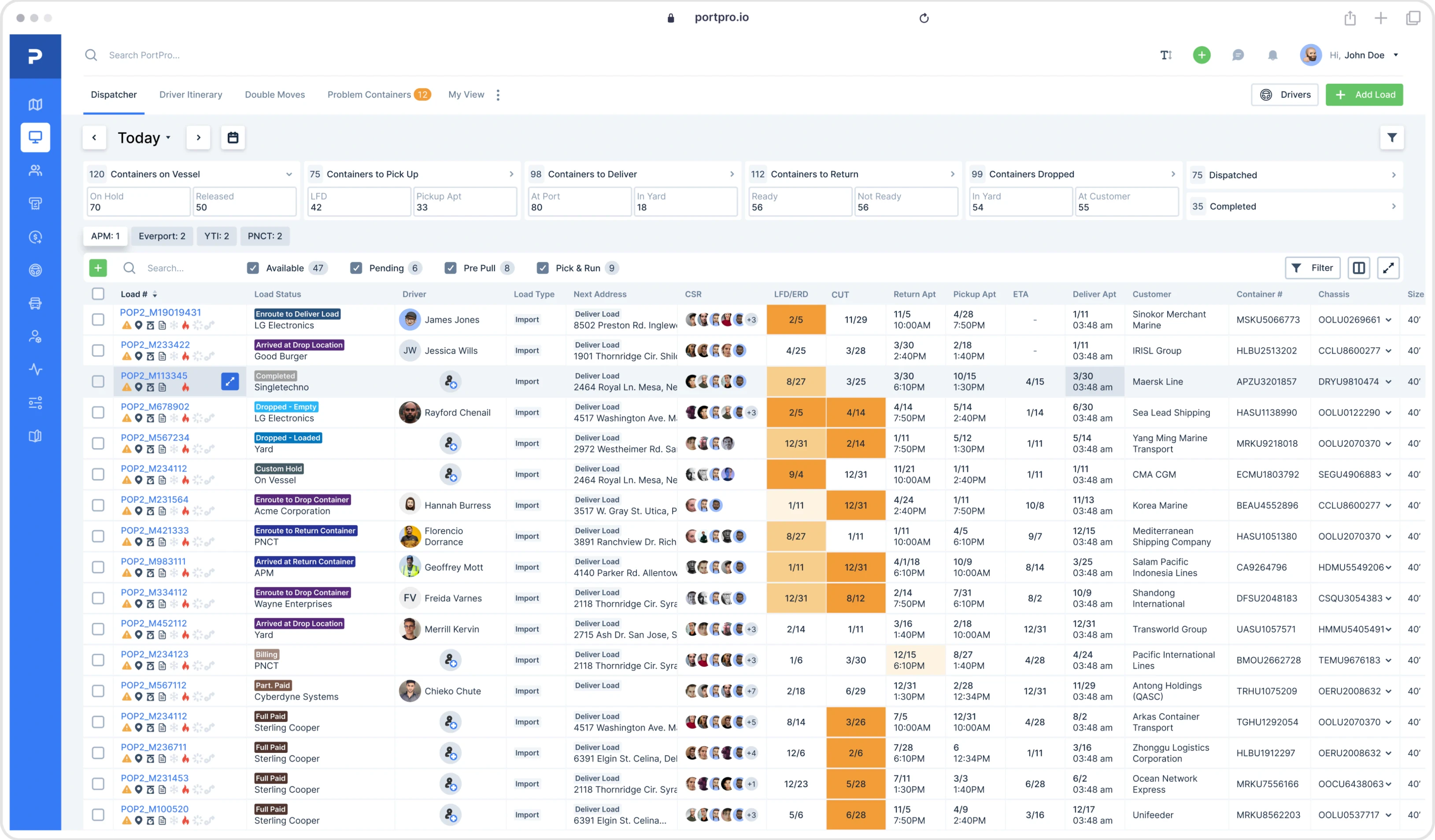
Plan loads, assign drivers, build routes, and manage the day from one connected dispatch view. PortPro’s intermodal dispatch software lets dispatchers build and adjust driver schedules with drag-and-drop planning tools, or use Jerry, PortPro’s AI dispatcher, to automatically generate an optimized plan based on available loads, drivers, and operational requirements.
Lock In Your Rate
See How Our Driver Dispatch Software Works
Trusted by hundreds of top drayage carriers & brokers


Customer Proof
Effective dispatch planning means knowing what needs to move, which drivers are available, where they are, what equipment they need, and how each move fits into the rest of the day.
PortPro brings driver availability, load planning, and scheduling information together so dispatchers can make better driver assignments and quickly adjust the dispatch plan without piecing together in one connected workspace, helping dispatchers make informed assignments, respond to changing priorities, and adjust schedules without juggling spreadsheets, whiteboards, and disconnected systems.

Plan Faster
See available drivers and loads together, then use drag-and-drop scheduling to quickly assign loads, organize driver schedules, and adjust plans as priorities change.
Make Better Assignments
Make smarter driver assignments using real-time availability, qualifications, appointments, routing, and load information to match drivers with the right loads while accounting for scheduling and operational requirements.
Keep the Day Moving
Use PortPro’s TMS dispatch system to see what each driver has completed, what’s next on their schedule, and how much work remains, helping dispatchers identify potential delays and adjust assignments throughout the day.


PortPro gives dispatchers the information and controls they need to build and adjust driver plans, manage driver workloads, and coordinate loads, routes, and equipment throughout the day.
01
Drag-and-Drop Driver Planning
Simplify load assignment by dragging loads directly onto driver schedules, giving dispatchers greater control over how work is distributed across available drivers.
02
AI Dispatch Software
Use Jerry, PortPro’s AI dispatch agent, to automatically build an optimized dispatch plan based on available loads and drivers. Review and adjust the plan before sending it to drivers, combining automated dispatch planning with the flexibility of human oversight.
03
Driver and Load Filters
Filter drivers and loads by availability, qualifications, driver type, and other operational criteria to narrow down suitable assignments and simplify dispatch planning.
04
Driver Routing and Scheduling
Plan each container move around pickup and delivery locations, appointment times, and driver availability, helping dispatchers coordinate routes and schedules more efficiently throughout the day.
05
Chassis Visibility
View chassis availability as you build the driver plan, helping dispatchers account for equipment availability when assigning container moves.
06
Driver Itineraries
See each driver’s assigned loads and daily itinerary, including completed milestones, trip duration, distance between stops, estimated arrival times, and projected driver pay, helping dispatchers monitor progress and balance driver workloads.
Good dispatch planning is about more than assigning a load to an available driver. Dispatchers have to consider driver availability, routing, equipment requirements, and appointment schedules to determine how to make the most of each driver's available time.
PortPro gives dispatchers a clearer view of those variables so they can build driver plans around the actual work that needs to get done. Its driver dispatch software and flexible scheduling tools help teams maximize driver utilization, reduce unnecessary trips, and make better use of available capacity.
From Available Load to Optimized Driver Plan

Available Loads

Available Drivers

Equipment
& Requirements

Route

Dispatch
Michael Mecca
CEO at PortPro

When an empty return and another container pickup can be combined into a single trip, dispatchers can reduce unnecessary terminal visits and make better use of driver time.
PortPro helps identify opportunities for dual transactions and street turns, allowing dispatchers to coordinate compatible container moves, minimize empty miles, and improve driver utilization.
Once the dispatch plan is ready, PortPro sends assigned loads and dispatch instructions directly to the Driver Mobile App, giving drivers the information they need to complete each move.
As drivers work through their schedules, dispatchers can monitor completed moves, track upcoming assignments, and identify where adjustments may be needed to keep operations on schedule.
Michael Mecca
CEO at PortPro
Good dispatch planning is about more than assigning a load to an available driver. Dispatchers have to consider driver availability, routing, equipment requirements, and appointment schedules to determine how to make the most of each driver's available time.
PortPro gives dispatchers a clearer view of those variables so they can build driver plans around the actual work that needs to get done. Its driver dispatch software and flexible scheduling tools help teams maximize driver utilization, reduce unnecessary trips, and make better use of available capacity.
PortPro Driver Scheduling Software vs. Basic Driver Scheduling vs. Manual Dispatch
Capability
Drag-and-Drop Driver Scheduling
AI-Powered Dispatch Planning
Driver & Load Filtering
Driver Routing & Scheduling
Chassis Visibility
Drayage-Specific Dispatch Workflows

PortPro
Assign loads directly to driver schedules
Jerry builds optimized driver plans for review
Filter by availability, qualifications, driver type, and loads
Routing integrated into the driver plan
Chassis availability visible during planning
Purpose-built for drayage operations
Basic Scheduling Tool
Varies by tool
Varies by tool
Varies by tool
Varies by tool
Typically separated
Varies by tool
Manual Dispatch
Varies by tool
Not available
Manually reviewed
Managed separately
Manually checked
Managed manually
Give dispatchers the visibility and operational information they need to manage complex
drayage schedules, improve driver utilization, and get more from every dispatch plan.
PortPro AI
Discover additional features built into PortPro’s comprehensive drayage TMS.
01
Container Tracking
Use container tracking data to see what’s ready to move and prioritize loads based on container status and availability when building driver plans.
Explore more
02
Appointment Booking
Plan driver schedules around confirmed pickup and return appointments to better align driver assignments with terminal availability and appointment windows.
Explore more
03
Driver Mobile App
Send load details and dispatch instructions directly to drivers through the Driver Mobile App, keeping dispatch and drivers connected from assignment through delivery.
Explore more
04
Reporting & Dashboards
Turn operational data into insights on driver activity, dispatch performance, and fleet operations to identify bottlenecks, monitor performance trends, and uncover opportunities to improve efficiency.
Explore more
Drayage Dispatch Software FAQs
What is drayage dispatch software?
Drayage dispatch software helps carriers plan and manage container moves by assigning loads to drivers, coordinating driver schedules, planning routes, and managing equipment requirements. PortPro brings these functions together in one connected dispatch workflow, giving dispatchers the visibility and tools they need to build and adjust driver plans throughout the day.
How does PortPro’s driver scheduling software work?
PortPro gives dispatchers visibility into available drivers and loads so they can build and adjust the day’s schedule. Dispatchers can filter drivers and loads, drag loads directly onto driver schedules, review routing, adjust assignments, and send dispatch details directly to drivers through the PortPro Driver Mobile App.
Can PortPro’s AI dispatch software automatically build a driver plan?
Yes. Jerry, PortPro’s AI dispatch agent, can automatically build an optimized driver plan based on available loads and drivers. Dispatchers can review the plan, make adjustments, and approve the final details before sending them to drivers.
Can dispatchers build their own driver plans in PortPro?
Yes. Dispatchers can build and adjust driver schedules using PortPro’s drag-and-drop Driver Planner. They can filter available drivers and loads, assign moves, review routing, and finalize the dispatch plan before sending assignments to drivers.
Can PortPro help plan dual transactions?
Yes. PortPro can help identify opportunities to pair compatible moves, such as an empty return with another container pickup. Dispatchers can incorporate these opportunities into driver trip planning to reduce empty miles, minimize unnecessary trips, and improve driver utilization.
Can PortPro filter drivers by qualifications or availability?
Yes. PortPro’s Driver Planner lets dispatchers filter drivers by availability, driver type, hazmat qualifications, and other operational requirements, helping dispatchers match drivers to loads based on the specific requirements of each move.
How does PortPro send dispatch information to drivers?
Once the dispatch plan is ready, PortPro sends assigned loads and move details to the Driver Mobile App. Drivers can access the information they need to complete each move while dispatchers monitor progress and stay connected to driver activity throughout the day.

See PortPro in action
We know the challenges facing drayage carriers aren't going away overnight. We want to help you start the new year with lower technology costs and a more efficient operation.
That's why we're offering more than 50% savings on PortPro to just 10 qualifying new carriers.
Schedule a meeting with our team to see PortPro in action, learn about the offer, and review your eligibility.
Lock In My Rate