DISPATCH & CONTAINER TRACKING FOR BROKERS
Freight Load Visibility Software for Drayage Brokers
Know What’s Happening With Every Drayage Load
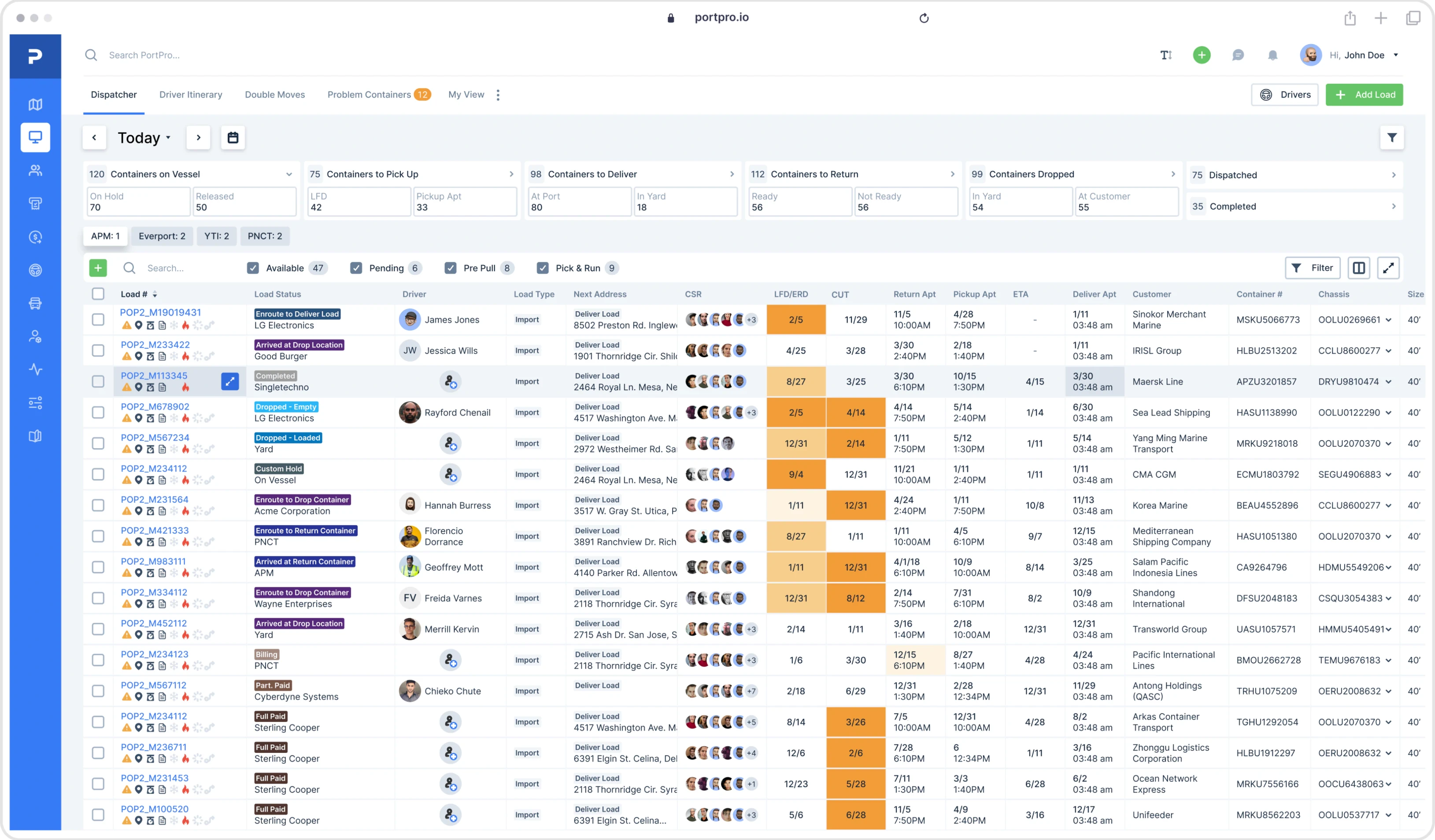
PortPro gives brokers visibility into drayage loads and containers from pickup through delivery. See active driver locations, container activity, load status updates, delivery timelines, and documents without calling the carrier every time you need an update.
Trusted by hundreds of top drayage carriers & brokers



Stop Calling Carriers Just to Find Out What’s Happening
When a drayage load is handled by a third-party carrier, getting an update can mean another call, text, or email. Multiply that across active loads and your team can spend a significant part of the day chasing information instead of managing freight.
PortPro gives brokers direct visibility into the loads and containers their carriers are moving.

Reduce Carrier Status Calls
See load status and driver location without contacting the carrier for every update.

Track Loads in One Place
Monitor active brokered loads and container activity without piecing together updates from multiple carriers.

Get Documents Faster
Access documents uploaded by the carrier without waiting for them to be sent separately.


PortPro gives brokers a centralized view of the third-party carrier activity behind their drayage loads, from active driver tracking to container locations and load documents.
01
Real-Time Driver Tracking
See the live GPS location of the driver while they are actively moving the load.


02
Load Status Visibility
Monitor load status as the carrier progresses through the move instead of relying on manual check calls.

03
Container Visibility
Track container activity associated with brokered drayage loads and see where loaded and empty containers have been dropped.
04
Delivery Timeline Visibility
See delivery information alongside load status and driver activity to understand how the move is progressing.


05
Carrier-Uploaded Documents
Access documents uploaded by the carrier and keep them connected to the corresponding load.

06
Load-Level Information
Keep carrier, driver, container, status, location, and documentation connected to the same brokered load.
See Where Active Drayage Loads Are Without Calling the Carrier
Your team shouldn’t need to interrupt a carrier every time a customer asks where a load is.
PortPro gives brokers real-time load tracking for active drayage moves, including driver location and load status. Your team can check the move directly and focus carrier communication on situations that actually need attention.
Active Load

Driver Location

Load Status

Delivery Progress
Track Loaded and Empty Container Locations
Drayage visibility doesn’t end when the driver reaches the delivery location.
PortPro gives brokers visibility into loaded and empty container drop locations so your team can see where equipment is throughout the move. That gives you more context around container activity without waiting for another carrier update.

Loaded Container Location Tracking
See where loaded containers have been dropped as the move progresses.
Empty Container Location Tracking
Track where empty containers have been dropped so your team has a clearer picture of the container workflow.
Get Load Documents Without Chasing the Carrier
Status isn’t the only information brokers have to request from carriers. Documents can create another round of emails and follow-up after the load moves.
PortPro keeps carrier-uploaded documents connected to the load so your team can access the documentation associated with the move without asking the carrier to resend it.
Carrier-Uploaded Documents
See documents submitted by the carrier directly within the corresponding load.
Document-to-Load Matching
Keep documentation associated with the correct load so your team knows which files belong to which move.
Invoice Document Attachment
Keep relevant load documentation available for the workflows that follow, including invoicing.
Give Customers Better Answers About Their Loads
When customers ask for an update, your brokerage needs the information before it can provide the answer.
PortPro gives your team access to load status, driver location, container activity, delivery information, and documents so you can keep customers informed without first chasing the carrier for every detail.
Customer Communication
Carrier Activity → PortPro Visibility → Customer Update

More Than a Freight Tracking Tool
A basic tracking tool can show a dot on a map. PortPro connects freight visibility with the broader drayage brokerage workflow.
Your team can see carrier activity, load status, driver locations, container information, delivery timelines, and documents within the same platform used to manage the load.
PortPro vs. Standalone Tracking vs. Manual Carrier Updates
| Capability | PortPro | Standalone Order Entry Tool | Manual Entry | |
|---|---|---|---|---|
| 1 | Active Load Tracking | Connected to brokered load | Typically available | Requires carrier contact |
| 2 | Driver GPS Location | Available during active move | Varies by tool | Requires carrier update |
| 3 | Load Status Visibility | Connected | Varies by tool | Requires carrier update |
| 4 | Container Visibility | Connected to drayage workflow | Varies by tool | Gathered manually |
| 5 | Loaded & Empty Drop Locations | Available | Varies by tool | Requires carrier update |
| 6 | Delivery Timeline Visibility | Connected to load | Varies by tool | Gathered manually |
| 7 | Carrier Documents | Connected to load | Typically separate | Requested separately |
| 8 | Broader Broker Workflow | Connected in PortPro | Typically separate | Managed across systems |

See the load, container, carrier activity, and documents without rebuilding the story from calls, texts, and emails.
Manage More of Your Drayage Operations with PortPro
Discover additional features built into PortPro’s comprehensive drayage TMS.
01
PortPro for Drayage Brokers
Manage your broader drayage brokerage workflow from one platform.
Explore more
02
Customer Communication
Keep customers informed using the load and container information already moving through PortPro.
Explore more
03
Carrier Pay
Calculate and manage what outside motor carriers are owed for completed work.
Explore more
04
Reporting & Dashboards
Use operational data to understand performance across your brokerage.
Explore more
Freight Load Visibility FAQs for Drayage Brokers
What is freight load visibility software?
Freight load visibility software gives brokers information about the status and location of loads being moved by carriers. PortPro gives drayage brokers visibility into active driver locations, load status, container activity, delivery information, and carrier-uploaded documents.
How can freight brokers track drayage loads?
Freight brokers can use PortPro to monitor active drayage loads and the third-party carriers moving them. Brokers can see load status, active driver GPS location, container information, delivery timelines, and associated documents without contacting the carrier for every update.
Does PortPro provide real-time load tracking for freight brokers?
Yes. PortPro provides live GPS visibility into the driver while that driver is actively moving the load. This gives brokers a direct view of active load movement without relying solely on manual carrier status updates.
Can brokers track container locations in PortPro?
Yes. PortPro gives brokers visibility into container activity associated with their drayage loads, including where loaded and empty containers have been dropped.
Can PortPro track third-party carrier loads?
Yes. PortPro is designed to give brokers visibility into drayage loads handled by third-party carriers, including load status, driver location, container activity, delivery information, and documents.
Can brokers access documents uploaded by carriers?
Yes. Documents uploaded by the carrier can stay connected to the corresponding load in PortPro, giving the brokerage access to load documentation without requesting it separately.
How does freight visibility reduce carrier check calls?
Freight visibility gives brokers direct access to information they would otherwise need to request from the carrier. When load status, active driver location, container activity, and documents are already visible in PortPro, routine check calls can be reserved for situations that actually require a conversation.
What’s the difference between freight visibility software and a drayage broker TMS?
Freight visibility software primarily focuses on tracking load status and movement. A drayage broker TMS supports the broader operational workflow. PortPro combines load and container visibility with the tools brokers use to manage drayage operations.

See What’s Happening With Every Brokered Drayage Load
See how PortPro gives your team visibility into carrier activity, load status, driver locations, containers, and documents without relying on constant carrier check calls.
Schedule a Demo