Blog
Truck Dispatch Automation: What It Is and Which Workflows to Automate First
Truck Dispatch Automation: What It Is and Which Workflows to Automate First
Truck Dispatch Automation: What It Is and Which Workflows to Automate First
In this Article:
Something Cool
Get drayage insights to your inbox every month
It's 8 a.m., and your dispatcher has already updated three driver assignments, checked terminal appointments, responded to a handful of customer emails, and entered orders that arrived overnight.
And the day is just getting started.
For trucking companies, dispatch involves a constant stream of decisions. Loads need to be assigned, drivers need instructions, schedules change, and customers want updates. In drayage, add container availability, terminal appointments, empty returns, and last free days to the mix.
It's a lot to manage, especially when much of the work happens manually.
Truck dispatch automation helps operations teams handle repetitive tasks, organize information, and make scheduling decisions more efficiently. The challenge is knowing which workflows are worth automating first and where dispatchers still need to make the call.
Truck dispatch automation reduces repetitive administrative work. It uses technology to handle tasks such as order intake, status updates, appointment coordination, and parts of dispatch planning.
Not every dispatch task requires AI. Rules-based automation works well for predictable activities, while AI can help evaluate more complicated scheduling and assignment decisions.
Drayage adds another layer of complexity. Container readiness, terminal restrictions, chassis availability, and empty returns all influence dispatch decisions.
Start with workflows that consume the most time. High-frequency tasks with reliable data and clear processes are often good candidates for automation.
Dispatchers remain essential. Automated recommendations still need human oversight, particularly when appointments change, exceptions arise, or customer requirements conflict.
Truck dispatch automation is the use of technology to perform or assist with repetitive dispatch tasks, including load assignments, scheduling, order processing, appointment coordination, and status communications. It reduces manual work by using predefined rules, connected systems, or AI-assisted recommendations to support daily trucking operations.
Some workflows are straightforward to automate. For example, a system might send a customer notification when a driver completes a delivery.
Others require more judgment. Assigning drivers across multiple loads means considering availability, location, equipment, appointment windows, and delivery requirements.
That's where AI-assisted planning can help.
In drayage, these decisions become more complicated because dispatchers also need to account for terminal operations, container availability, last free days, and empty equipment returns.
Automation can support those decisions, but it still needs accurate information and clear operational rules.
Dispatchers spend a surprising amount of time on work that has little to do with actually deciding where trucks should go.
They enter delivery orders, check container statuses, update spreadsheets, schedule appointments, respond to emails, and contact drivers for updates.
Meanwhile, the dispatch plan they created that morning is already changing.
A driver finishes earlier than expected. A container isn't available. A terminal appointment gets pushed back. Another customer needs a pickup moved up.
Each change can require several manual updates across different systems.
For smaller carriers, this work may be manageable with a dispatcher or two. As load volume increases, however, the administrative burden grows alongside it.
Hiring additional dispatchers isn't always the most efficient answer, especially when existing employees are spending hours on repetitive tasks.
Truck dispatch automation gives carriers another option. By automating routine activities and making operational information easier to access, teams can spend more time coordinating loads and resolving the issues that genuinely need their attention.
The opportunity is particularly relevant in drayage, where a single load may involve multiple appointments, equipment requirements, and status changes before it's completed.
Not every part of dispatch should run automatically, but several common workflows are well suited for automation.

Creating a dispatch schedule involves matching available drivers with loads while accounting for location, equipment, appointment times, and customer requirements.
Traditionally, dispatchers build these schedules manually, relying on spreadsheets, experience, and frequent communication with drivers. Truck dispatch automation helps simplify this process by organizing available loads, identifying potential assignments, and recommending scheduling options.
For example, consider a drayage carrier managing 50 loads across multiple terminals. Instead of manually assigning every load, the dispatcher can use AI-assisted planning to evaluate driver availability, appointment windows, equipment requirements, and other scheduling constraints. The dispatcher can then review the proposed schedule and make adjustments based on what's happening in the operation.
PortPro's AI dispatcher, Jerry, helps streamline this process by generating dispatch plans that dispatchers can review and adjust before putting them into action.
Scheduling terminal appointments can be one of the more time-consuming parts of drayage dispatch.
Dispatchers need to find available appointment windows, coordinate them with container readiness, and make sure the assigned driver can arrive on time.
Automation can help streamline appointment requests, track confirmations, and identify scheduling conflicts where terminal integrations and workflow capabilities allow.
However, appointment availability and terminal-specific requirements still determine what's possible.
If a container is on hold or the terminal has no available slots, automation cannot make those restrictions disappear.
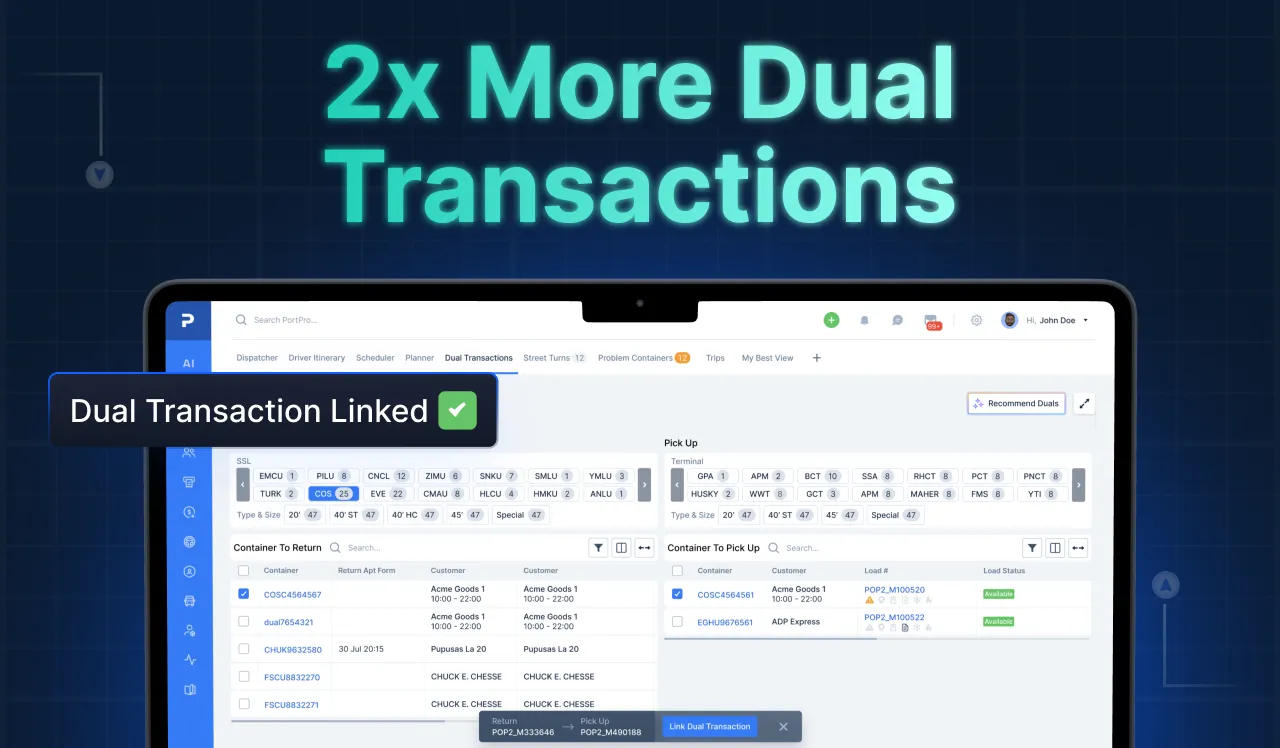
Drayage carriers frequently look for opportunities to combine an empty container return with another container pickup.
These dual transactions can help reduce unnecessary truck movements, but finding compatible moves requires careful coordination.
Dispatchers need to consider the empty return location, next pickup terminal, equipment compatibility, appointment windows, and driver availability.
Automation can help identify potential combinations and support planning.
The dispatcher still needs to confirm that the move is feasible, especially when terminal restrictions or return instructions change.
Dispatchers often spend a considerable amount of time answering questions about load status.
Has the driver arrived? Was the container picked up? Is the delivery complete?
When drivers record milestones through a connected mobile application, those updates can support automated internal workflows and customer notifications.
Instead of manually sending every routine update, dispatchers can focus on exceptions and situations that require a personal response.
The reliability of this workflow depends on accurate driver activity and timely event information.
Before a load can be dispatched, someone needs to enter it into the system.
For carriers receiving delivery orders by email, that may involve opening attachments, copying container details, entering pickup and delivery information, and checking that nothing was missed.
Automated document processing and AI-assisted email intake can help extract relevant information and prepare load records.
Operations teams should still review incomplete, conflicting, or unusual information before the load is accepted.
A wrong container number or delivery address can create far more work than the original data entry would have required.
Dispatch Workflow | Traditional Manual Process | Automation Opportunity | Operational Benefit | Human Oversight |
Driver assignment | Dispatcher reviews loads and driver schedules | Recommend assignments based on available information | Faster planning and fewer manual comparisons | Confirm feasibility and priorities |
Terminal appointments | Check portals and enter appointment details | Assist with requests, confirmations, and changes | Less repetitive scheduling work | Resolve unavailable slots and restrictions |
Dual transactions | Manually compare empty returns and pickups | Identify compatible move combinations | Better equipment and driver coordination | Validate terminal and equipment requirements |
Driver status updates | Call or message drivers for progress | Capture milestones through connected workflows | Fewer routine check-ins | Investigate missing or inconsistent updates |
Customer communication | Send individual status emails | Trigger updates from verified events | More consistent communication | Handle delays and sensitive situations |
Order entry | Re-enter details from emails and documents | Extract information and prepare load records | Reduced manual data entry | Review exceptions and accuracy |
It's tempting to start with the most impressive-looking technology. But the best first automation project is usually the one that solves a problem your team deals with every day.
Start by looking at how dispatchers actually spend their time.
Which tasks are repeated dozens of times? Where do errors happen? What regularly causes delays or forces employees to enter the same information twice?
Then consider how reliable the underlying data is.
A repetitive workflow with consistent inputs is generally easier to automate than one involving unpredictable terminal requirements and frequent exceptions.
Workflow | Typical Manual Effort | Potential Impact | Implementation Considerations | Suggested Starting Point |
Order entry and intake | High when orders arrive through email | Reduces repetitive data entry | Document consistency and validation | Often a strong early candidate |
Status updates | High when updates require calls and emails | Reduces routine communication | Driver adoption and event accuracy | Often a strong early candidate |
Appointment booking | Varies by terminal and load volume | Reduces scheduling effort | Terminal connectivity and appointment rules | Evaluate after workflow review |
Dual transactions | Requires manual comparison and coordination | May improve truck and equipment utilization | Equipment, location, and appointment compatibility | Introduce when planning data is reliable |
AI-assisted dispatch planning | High for complex operations | Supports faster, more coordinated planning | Driver, load, equipment, and constraint data | Pilot with dispatcher oversight |
These are starting recommendations, not universal rankings. A carrier spending hours every day on appointment scheduling may reasonably prioritize that workflow ahead of order entry.
The right sequence depends on where the operation is experiencing the most friction.
Traditional automation follows predefined instructions.
For example, when a driver marks a load as delivered, a system can trigger a customer update. The conditions and resulting action are established in advance.
AI-assisted automation can help with situations involving more variables.
Consider a dispatcher planning a day's work for multiple drivers. Each driver has a different location, schedule, and equipment availability. Loads have pickup windows, delivery requirements, and terminal constraints.
An AI-assisted planning system can evaluate combinations of these factors and recommend assignments or adjustments.
This is where AI trucking dispatch can become useful, particularly for operations with changing schedules and complex requirements.
However, the recommendations are only as dependable as the data and constraints used to generate them.
Category | Rules-Based Automation | AI-Assisted Dispatch |
Decision logic | Follows predefined conditions | Evaluates data and recommends decisions |
Best suited for | Routine, predictable workflows | Multi-constraint planning and changing conditions |
Example | Send an update after a recorded milestone | Recommend driver and load assignments |
Required inputs | Reliable triggers and established rules | Accurate operational data and relevant constraints |
Response to changes | Follows predefined exception paths | May generate revised recommendations |
Human oversight | Review failed triggers and exceptions | Validate recommendations and operational feasibility |
Limitations | Cannot easily handle situations outside defined rules | May produce unsuitable recommendations when information is incomplete |
Dispatch decisions affect drivers, customers, equipment, and compliance obligations.
Even when a system recommends a workable schedule, dispatchers need to consider information that may not be reflected accurately in the underlying data.
A driver might be unavailable unexpectedly. A customer could have a special delivery requirement. A terminal restriction may have changed.
The NIST AI Risk Management Framework provides a broader framework for managing AI-related risks, including the importance of governance, evaluation, and oversight.
For trucking operations, that reinforces the need to establish clear review processes before relying on automated recommendations.
AI automation for dispatch efficiency works best when the system handles repetitive analysis and dispatchers remain responsible for decisions that require operational judgment.
A successful automation project starts with understanding the existing workflow.
Trying to automate everything at once can create confusion, particularly when dispatchers are already managing a busy operation.
Spend time reviewing how your dispatch team works.
Look for tasks that require frequent manual entry, repeated status checks, or constant switching between systems.
Ask dispatchers which activities take the most time and where they regularly encounter errors or delays.
Their answers may be different from what management expects.
Automation depends on reliable information.
Before implementing a workflow, confirm that driver availability, load details, equipment information, and appointment requirements are being recorded consistently.
If the data is incomplete or outdated, automation may simply make bad information move through the operation faster.
For dispatch planning, carriers also need to account for applicable driver requirements. The FMCSA Hours of Service regulations provide important context for planning compliant driving and duty schedules.
Choose a workflow with a clear problem, measurable results, and manageable implementation requirements.
For some carriers, that may be order entry. For others, it may be routine customer updates or appointment coordination.
Introduce the workflow with a limited group of users or loads before expanding it across the operation.
Decide which actions can happen automatically and which require approval.
For example, routine milestone notifications may be appropriate for automatic execution when the underlying event is reliable.
A complicated driver reassignment involving multiple appointments may warrant dispatcher review.
Employees should also know how to correct inaccurate information and override unsuitable recommendations.
After implementation, compare the new workflow with the original process.
Has manual effort decreased? Are dispatchers handling more loads without sacrificing accuracy? Are there fewer missed updates or scheduling errors?
Use those findings to refine the workflow before expanding automation to other parts of the operation.

Automation should solve a measurable operational problem.
Before implementing a new workflow, establish a baseline so you can evaluate whether it's making a difference.
The metrics that matter will depend on the activity being automated.
KPI | What It Measures | Why It Matters | How to Establish a Baseline |
Manual dispatcher hours | Time spent on repetitive tasks | Shows administrative workload | Track time spent on selected activities |
Loads per dispatcher | Number of loads managed per dispatcher | Helps assess operating capacity | Review historical load volume and staffing |
Dispatch planning time | Time required to create or revise schedules | Measures planning efficiency | Record average planning time |
Appointment scheduling effort | Time spent requesting and changing appointments | Shows scheduling workload | Sample appointment activity |
Customer status inquiries | Requests for routine load updates | Indicates communication burden | Count inquiries over a representative period |
Entry errors and rework | Corrections to orders and load records | Measures process accuracy | Track corrections and their causes |
Driver utilization | Productive use of available driver time | Helps evaluate assignment quality | Compare planned and actual activity |
Unnecessary truck movements | Avoidable trips or repositioning | Helps assess operational coordination | Review movement records and exceptions |
Avoid evaluating success based on one metric alone.
For example, increasing loads per dispatcher may look positive, but not if it also leads to more errors, missed appointments, or customer complaints.
The goal is to understand whether automation is improving the overall operation.
For drayage carriers, automation becomes more useful when it's connected to the same system used to manage loads, drivers, containers, and customers.
PortPro is a drayage-native TMS that brings these workflows together and incorporates AI agents to help reduce manual operational work.

PortPro's dispatch automation capabilities are designed to support activities such as:
AI-assisted dispatch planning: Jerry, PortPro's AI dispatcher, helps generate dispatch plans that teams can review and adjust.
Appointment and dual transaction coordination: Connected planning workflows help dispatchers manage terminal requirements and evaluate compatible moves.
Driver and customer updates: Operational milestones support more consistent status communication.
Order entry and email-assisted intake: AI-assisted workflows help process incoming order information and reduce repetitive entry.
The practical value comes from connecting these activities. A container status change may affect an appointment, which may affect a driver assignment and require a customer update.
Managing those relationships in one operational environment can reduce the amount of manual coordination dispatchers need to handle.
For carriers evaluating dispatch automation tools for US trucking operations, it's important to look beyond individual features and consider how well the technology supports their actual workflows, especially the terminal and equipment requirements specific to drayage.
Explore PortPro's Driver Dispatch & Planning capabilities to see how AI-assisted planning fits into daily drayage operations.
Truck dispatch automation uses technology to handle or assist with routine dispatch activities, including order entry, scheduling, driver assignments, appointment coordination, and status updates. It can rely on predefined rules or AI-assisted recommendations. The objective is to reduce repetitive manual work while giving dispatchers more time to manage exceptions and operational decisions.
Common candidates include order intake, load creation, customer notifications, driver status updates, appointment coordination, and portions of dispatch planning. More complex activities, such as driver assignments and dual transaction planning, can benefit from automated recommendations but often require human review to account for changing schedules and operational constraints.
AI can assist with dispatch planning by evaluating multiple factors, including driver availability, load requirements, locations, equipment, and appointment windows. It can recommend assignments or scheduling adjustments based on available information. Dispatchers still need to review recommendations, particularly when data is incomplete or unexpected operational changes occur.
Traditional automated dispatch generally follows predefined rules, such as sending an update when a delivery milestone is recorded. AI-assisted dispatch can evaluate multiple variables and recommend planning decisions that are more difficult to define through simple rules. Both approaches depend on accurate data, and neither eliminates the need for exception handling.
Yes. Automating repetitive activities such as order entry, status notifications, and appointment administration can reduce the amount of manual processing required. The actual impact depends on workflow design, data quality, and how consistently the technology is used. Carriers should measure time spent on specific tasks before and after implementation.
Start with frequent, time-consuming tasks that have consistent inputs and clear processes. Order intake and routine status updates are often practical starting points. Appointment booking and AI-assisted planning may offer substantial value but require closer evaluation of terminal connectivity, data quality, scheduling constraints, and dispatcher review requirements.
Dispatch automation is generally intended to support dispatchers rather than eliminate their role. Systems can handle repetitive processing and assist with planning, but dispatchers remain important for resolving exceptions, managing customer requirements, responding to terminal changes, and making decisions when information is incomplete or conflicting.